version 1.1G
In this tutorial, you will learn how to use two fashion apps for finding better fitting clothes: the Measurement Tool vs. the Comparator tool. Each of these useful fitting tools perform something differently in how they show a standardized relationship between you and clothes. These apps are free to use. Tips: You can also use these two tools to input or share clothing measurement data for online sales and descriptions to help with size and fit questions.
The Measurement Tool will give you an approximation of how clothes might fit on you relative to your baseline measurements. This app helps you figure out many details if you can’t first try it on in a fitting room. Practically, you will still need to try on new clothes to know if you really like it or if it fits right.
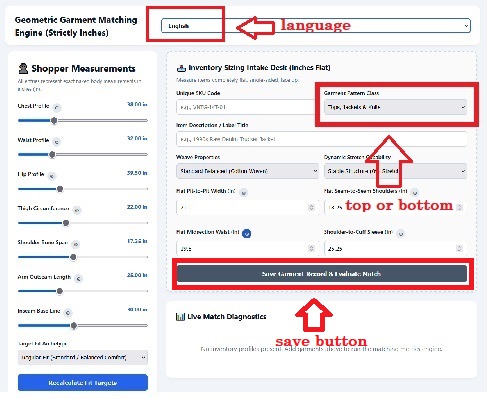
Open the Measurement Tool: choose the language mode and measurement mode here: cm or inches. Tips: Each input for a measurement also contains a clickable “how to measure it” instruction.
Get a baseline: Select if you are measuring a Top or Bottom. Enter your personal measurement details (left column) as well as the measurement details of the new clothing (right column). You can name it in the “Item Description / Label Title” field. Then click on “Save Garment Record and Evaluate Match” button. You can add new pieces of clothing and name them and then press the “Save Garment Record” button again. This is one way to check fit without having to solely rely on a manufacturer’s sizing charts or international region differences. Write down these measurements when visiting a shop (or website) or check online here again to do more comparisons. For garments, use a flexible vinyl/fibreglass Tailor’s Tape. For accessories, use a Steel Retractable Tape Measure. Tips: Using picture screenshots, the multi-language feature can be used to share measurements in a standardized way across the internet between parties. The measurements and instructions are similarly arranged and translated for better uniformity.
Here is a measurement website (non-affiliated) for |shirts|, |t-shirts|, |sweatshirts| and |pants|.
When you plug these numbers into the measurement tool app, look at the "Match %":
If the match is above 90%, the garment may be close to your technical measurements (without accounting for human error and manufacturing techniques).
If it's lower (70-85%): Look at why. Is the sleeve too long? Is the chest too small?
If it's under 70%: Hard Pass? The fit may have fundamental differences.
Tips: Let’s say you want to buy some clothing that looks very similar to what you already have because you like it so much. How would you find it? It needs to fit the same, feel the same, and just be a “replica”. Here’s how: go into your closet and measure your favourite fitting clothes to use as an original model. Then use the Comparator Tool app to compare the measurements of your original model against other similar pieces of clothing sold in stores or online. You can find the app here: |Comparator|. This “comparator” technique may help you assess similar shirts or pants which fit and feel like the original one you already own and love. For some people, the Comparator app reduces the stress of shopping for new clothes because now they have a way to replicate their fashion preferences. For others, it will enhance their joy of shopping because it adds a new and useful tool in their search (both for themselves and in gift-giving).
Build a wardrobe library by creating your own measurement data. Use the Measurement tool to determine the relationship between you and clothing. Or use the Comparator Tool to check the measurement relationships between clothing to clothing.
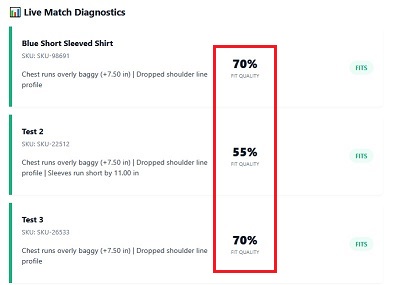
The Measurement tool (how it works) makes a measurement comparison between a person and clothing for a percentage “fit” match. Each particular piece of clothing (in its own style) hugs and fits differently - so check how it is represented in the measurement tool. The measurement tool shows a percentage match of that clothing relative to your body’s dimensions. Some people like tighter or looser fits depending on specific styles, so you will notice these percentage differences from piece to piece.
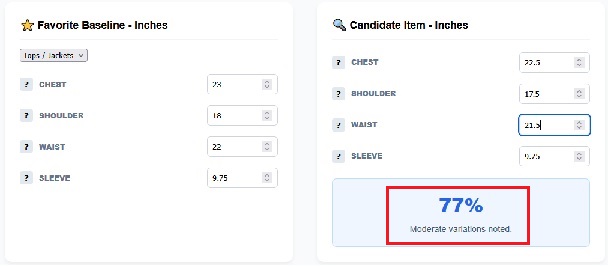
When using the Comparator tool (how it works), this app only compares clothing to clothing and then it shows a percentage “similarity” match between two things. So, it works best if you are comparing the same styles of clothing against each other (ie, slim fit, baggy fit, casual fit, etc) to help identify similar clothing in a particular style.
By using these two tools to look at these different relationships, you will be able to understand how different styles of clothing fit on you and how to compare equivalent styles.
Make sure to record this data in your own spreadsheet file or notebook. These tools do not remember your data after you reset it.
|
|
Measurement Tool (above): Percentage match between body measurements and clothing pieces. |
Comparator Tool (above): Percentage match between clothing. |
Many fit issues boil down to these three dimensions. If these match, the garment may be a good match. But remember, the material and its cut are still things which you need to try on to know for certain. And with experience, you will also learn which measurements are important to you. Let us know!
The Chest/Waist (The Width): Measure from the exact armpit seam to the other armpit seam (for tops), or straight across the waistband (for pants). Pro-tip: Double this number to get your "full" circumference.
The Length (The Reach): Measure from the top of the shoulder seam straight down to the cuff (tops), or from the crotch seam straight down to the hem (pants).
The Structure (The Shoulders/Rise): Measure the shoulder-to-shoulder seam on the back (tops) or the "Rise" from the centre crotch seam to the top of the waistband (pants).
Tips: Learning how to measure people and clothing is a useful skill. You can quickly jot down those measurements on your smartphone to help find clothes for yourself and others with less guess work or rough estimates. Measuring tapes are light and portable.
Developer Notes: |