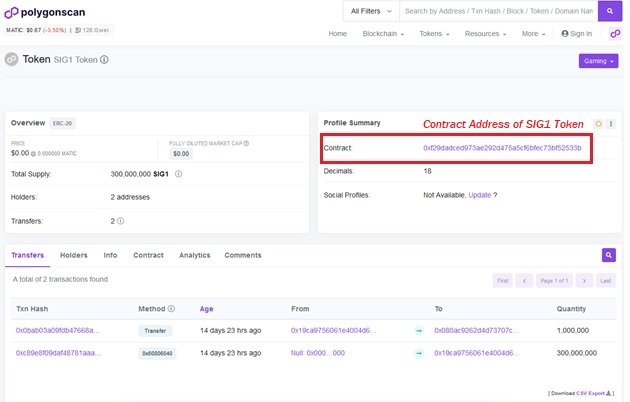
Check the contract address. Notice that the
contract is:
0xf29DaDcED973AE292d475A5CF6bFeC73bf52533B
This is the correct contract address of
the SIG1 Token.
If you require help, contact SigniumX
at toronto.uk.com in the Metaverse Help Desk Section at Second Life.
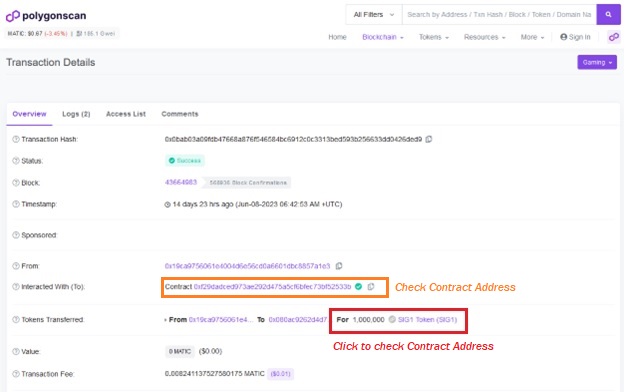
Click on the SIG1 Token (red box)
to check and confirm the contract address.
Notice that the orange box contains the
Contract Address:
0xf29DaDcED973AE292d475A5CF6bFeC73bf52533B
This is what the correct address should
be. If it is not this address, then this not a valid token.
Click on Transaction Hash for the
specific transaction.
Notes:
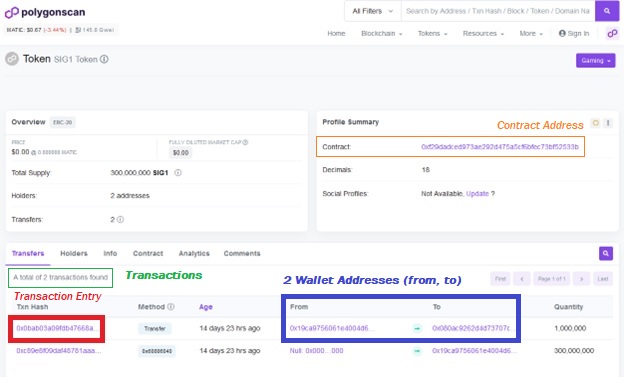
-Start by first looking at the TxN Hash, ie, "Transaction Hash" (Red
Box). This is the the list of transactions of token transfers.
-To identify your transaction, look for your MetaMask Wallet address
(blue box).
-Once you have located your transaction, click on the
TxN Hash.
How to locate the Transaction
Hash, Wallet Address, Contract Address.